Go Links @ Home
From DNS and Traefik shortcuts to Goku: my released, self-hosted golinks service written in Go, with custom aliases, placeholder patterns, and an admin UI.
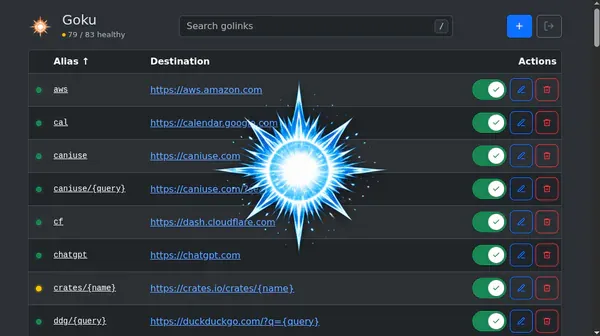
Update — October 7, 2026: Goku is here
The custom go-links service I wanted at the end of this post now exists: Goku. I built and released it as an open-source, self-hosted application written in Go.
Instead of editing Traefik redirect rules for every exception, I can manage aliases and destination templates in a web UI. Goku supports exact aliases, named placeholders, and placeholder defaults, with configuration stored in YAML. Public redirects and the admin UI run on separate ports.
The README has setup instructions, and releases are available on GitHub. The DNS setup still matters: go needs to resolve to the server or reverse proxy running Goku.
The Traefik approach below is where this started. The final section explains what became Goku and what remains on the wishlist.
The Problem
Typing full URLs gets tedious. status.example.com is a mouthful when you just
want to check your dashboard. What if you could just type go/status in your browser
and instantly get there?
The Solution: Go Links
Go links (also known as “go/” shortcuts) have been a staple at companies like Google for years. The concept is simple:
- Type
go/somethingin your browser - Get redirected to
https://something.example.com
This is typically achieved through DNS search domains combined with HTTP redirects.
How It Works
The magic happens in two parts:
1. DNS Search Domain
Configure your LAN to use a search domain example.com. When you type go/status
in your browser:
- Your browser searches for
go.example.com - DNS resolves
go.example.comto your Traefik instance - Request arrives:
http://go.example.com/status
2. Traefik Path-Based Redirects
Traefik intercepts the request and applies custom middleware to parse the path and construct a new URL:
$1= subdomain (extracted from path)$2= subpath on destination (optional trailing path)
For example:
go/status→https://status.example.comgo/grafana/dashboards→https://grafana.example.com/dashboards
Flow Diagram
sequenceDiagram
  participant Browser
  participant DNS
  participant Traefik
  participant Destination

  Browser->>Browser: User types "go/status"
  Browser->>DNS: Lookup "go.example.com"
  DNS-->>Browser: Returns Traefik IP
  Browser->>Traefik: GET http://go.example.com/status
  Traefik->>Traefik: Parse path: $1="status", $2=""
  Traefik->>Traefik: Construct: https://status.example.com
  Traefik-->>Browser: 302 Redirect to https://status.example.com
  Browser->>Destination: GET https://status.example.com
  Destination-->>Browser: Return page
Implementation
Step 1: DNS Configuration
Here is relevant code snippet for my AdGuard Home configuration:
filtering:
...
rewrites:
  - domain: 'go.example.com'
    answer: '192.168.0.2'
  - domain: 'go'
    answer: 'go.example.com'
Step 2: Traefik Middleware
http:
  middlewares:
    go-slug:
      redirectRegex:
        permanent: false
        regex: "^https?://go(?:\\.example\\.com)?/([^/?#]+)(.*)$"
        replacement: 'https://$1.example.com$2'
  routers:
    go:
      entryPoints:
        - web
        - websecure
      middlewares:
        - go-slug
      priority: 100
      rule: 'Host(`go`) || Host(`go.example.com`)'
      service: 'noop'
  services:
    noop:
      loadBalancer:
        servers:
          - url: 'http://127.0.0.1:65535'
Step 3: Common Shortcuts
Now instead of typing full URLs or bookmarking everything, you can simply:
- Type
go/status→https://status.example.com - Type
go/grafana→https://grafana.example.com
Clean, fast, and elegant.
Beyond simple redirects
While the original implementation works great for internal services following the
subdomain.example.com pattern, there are cases where you need more flexibility:
The Limitation
Not every shortcut fits the pattern. For example:
go/google→https://google.com(external site)go/docs/k8s→https://kubernetes.io/docs(custom mapping)go/gh/jovalle→https://github.com/jovalle(specific profile)go/technis/pull/24→https://github.com/jovalle/technis/pull/24(parameterized)
These don’t map to *.example.com subdomains and require custom rules.
The Solution: Goku
Goku is the dedicated go-links application I built to handle these cases. Traefik can route the go hostname to Goku’s public endpoint on port 9000; the admin UI and API live on port 9001.
An alias such as gh/{owner}/{repo} can resolve to https://github.com/{owner}/{repo}. The destination is explicit, so a shortcut can point to an external site just as easily as an internal service:
flowchart LR
    A[Browser: go/google] --> B{Traefik}
    B --> C[Goku: resolve alias]
    C --> D[Match exact alias or placeholder pattern]
    D --> E[Expand destination template]
    E --> F[Redirect to destination]
What shipped
- Exact aliases and placeholder patterns, including named placeholders and defaults.
- An admin UI to search, sort, add, edit, delete, enable, disable, and preview golinks.
- A YAML configuration file that reloads from disk and persists admin/API changes.
- Optional admin login, with session, basic, and bearer authentication for admin/API requests.
- Health endpoints and Prometheus metrics.
Still on the wishlist
The original roadmap went further than the released application. Per-link expiration, team-specific access rules, redirect analytics, and A/B testing remain ideas rather than shipped features.
Alternatives
There are browser extensions (Golinks and Trotto) that accomplish must of the same thing but require manually adding links. There’s also Tailscale’s golink but only works within a tailnet and still needs to be manually populated.